
Streamline Data Collection with SAP S/4HANA GRDC for Group Reporting
SAP Group Reporting Data Collection (GRDC): Streamline Data Collection with SAP S/4HANA GRDC for Group Reporting.
Introduction
In today’s globalised business environment, enterprises often operate across multiple geographies, subsidiaries, and ERP systems. Consolidation of financial data from these diverse sources is not just a compliance requirement, it is a strategic necessity. SAP addresses this challenge with SAP S/4HANA Finance for Group Reporting Data Collection (GRDC), a cloud-native solution designed to streamline data collection, transformation, and integration into the ACDOCU consolidation table of SAP S/4HANA Finance for Group Reporting.
SAP S/4HANA Finance for group reporting Data Collection is seamlessly embedded within SAP S/4HANA Finance for group reporting, enabling streamlined consolidation processes. This article provides an overview of its key functions and benefits, illustrating how it supports efficient data gathering and enhances reporting accuracy.
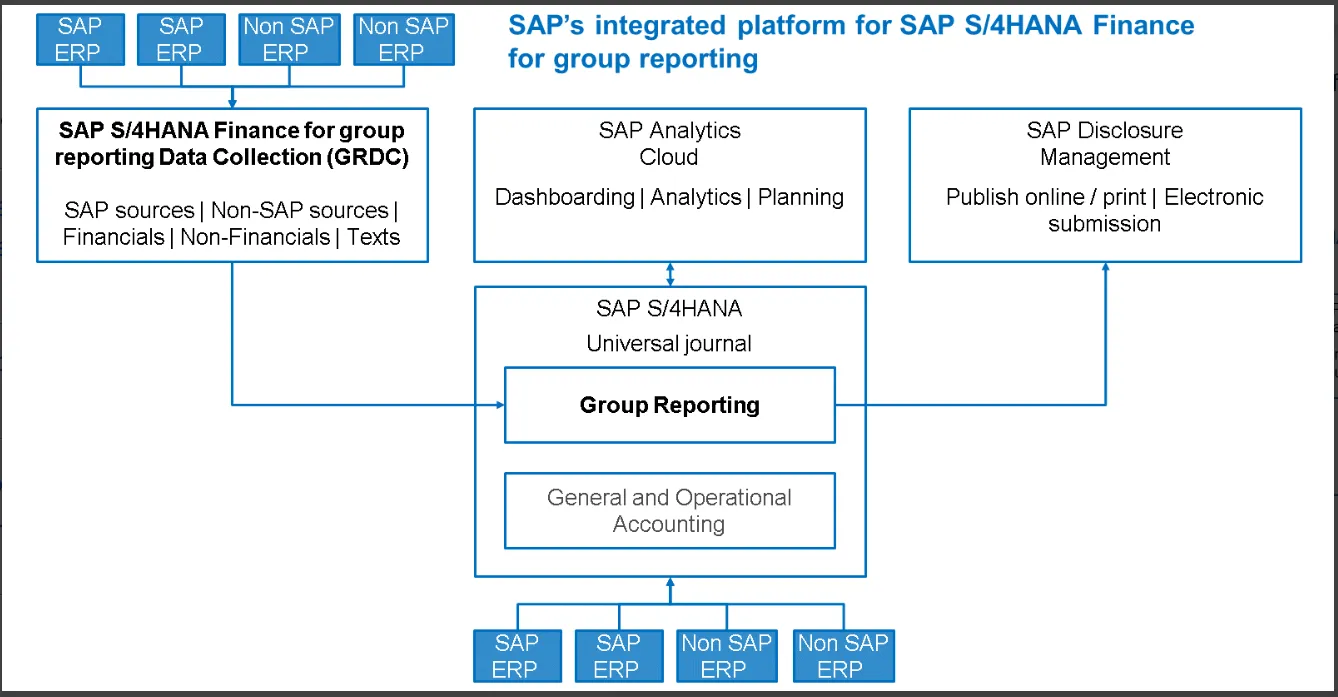
Source: SAP
SAP S/4HANA Finance for group reporting is a consolidation solution integrated with SAP S/4HANA.
To ensure flexibility, SAP S/4HANA Finance for group reporting has been developed based on a building block methodology. SAP S/4HANA is the central block integrating local and group close. It is available both in the cloud and on-premises. Additional building blocks are available in the cloud, such as the data collection apps for gathering information from your decentralised subsidiaries but also from your SAP-integrated companies.
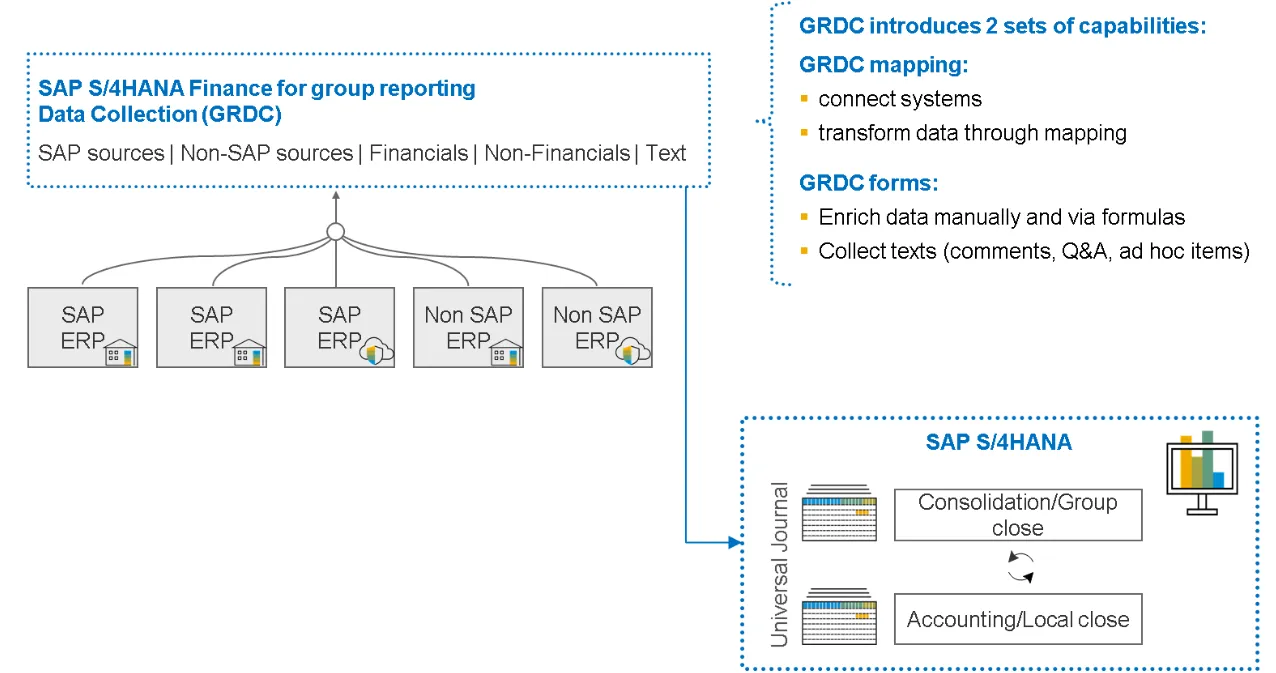
Source: SAP
SAP S/4HANA Finance for Group Reporting Data Collection (GRDC) is a suite of applications designed to streamline the collection of both financial and non-financial data. It enables users to capture comments, ad hoc items, and Q&A directly into SAP S/4HANA Finance for Group Reporting—for example, within the ACDOCU consolidation table.
As a strategic component of SAP’s consolidation portfolio, GRDC offers businesses an efficient, integrated, and user-friendly platform to gather, consolidate, and interpret financial information. It plays a key role in SAP’s overall product strategy for group reporting and consolidation.
GRDC delivers two core capabilities:
• Data Mapping: Automates the mapping, transformation, and loading of data from SAP and non-SAP systems into ACDOCU.
• Forms: Allows manual entry of data, comments, ad hoc items, and Q&A into ACDOCU using either pre-delivered templates or custom-built forms.
Together, these features make GRDC a powerful tool for ensuring accuracy, flexibility, and efficiency in the consolidation process.
GRDC provides two main features:
• With GRDC Data Mapping, you can automate the mapping, transformation, and data load from SAP and non-SAP systems into ACDOCU.
• With GRDC Forms, you can manually enter data, comments, ad hoc items, and questions and answers in ACDOCU using pre-delivered forms or by creating your own.
When to use SAP GRDC?
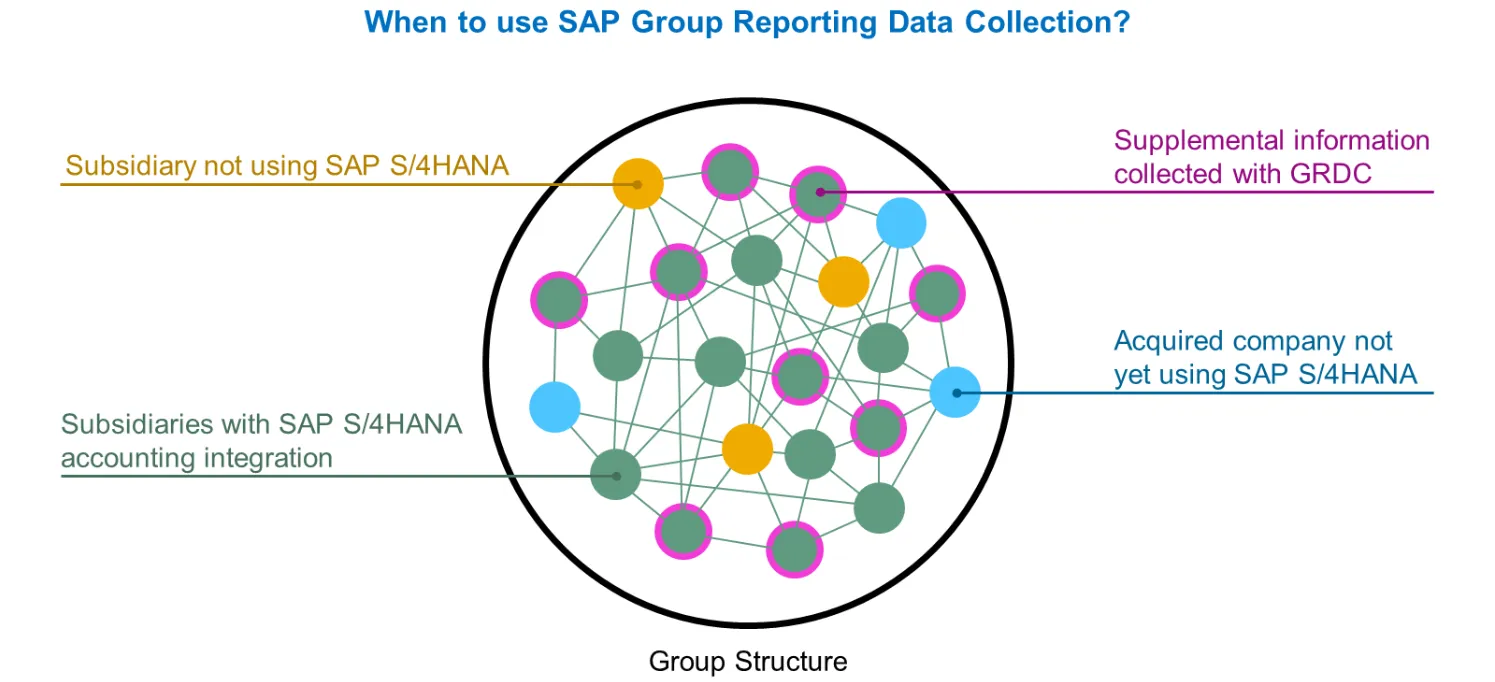
Source: SAP
SAP S/4HANA Finance for Group Reporting Data Collection (GRDC) is built to enhance the way organisations gather information. It supports both manual entry and automated processes through data mapping and ETL (Extract, Transform, Load) capabilities, making it flexible for different reporting needs.
When SAP S/4HANA for Group Reporting is used in a standalone setup, GRDC enables subsidiaries to provide not only financial figures but also non-financial inputs and commentary, ensuring a more complete reporting package.
In scenarios where Group Reporting is integrated with SAP S/4HANA Finance, GRDC adds further value by enriching released data from ACDOCA.
From a functional perspective, you can see some of the actions here.
• Import data from remote CSV source files.
• Import data from ECC.
• Import data from remote systems with Import API.
• Import ACDOCA data from remote systems.
• Import additional ACDOCA data for statistical information (for example, aging information of AR/AP).
• Copy missing consolidation units' reported data for non-material consolidation units.
• Run step consolidation.
What are the benefits of GRDC?
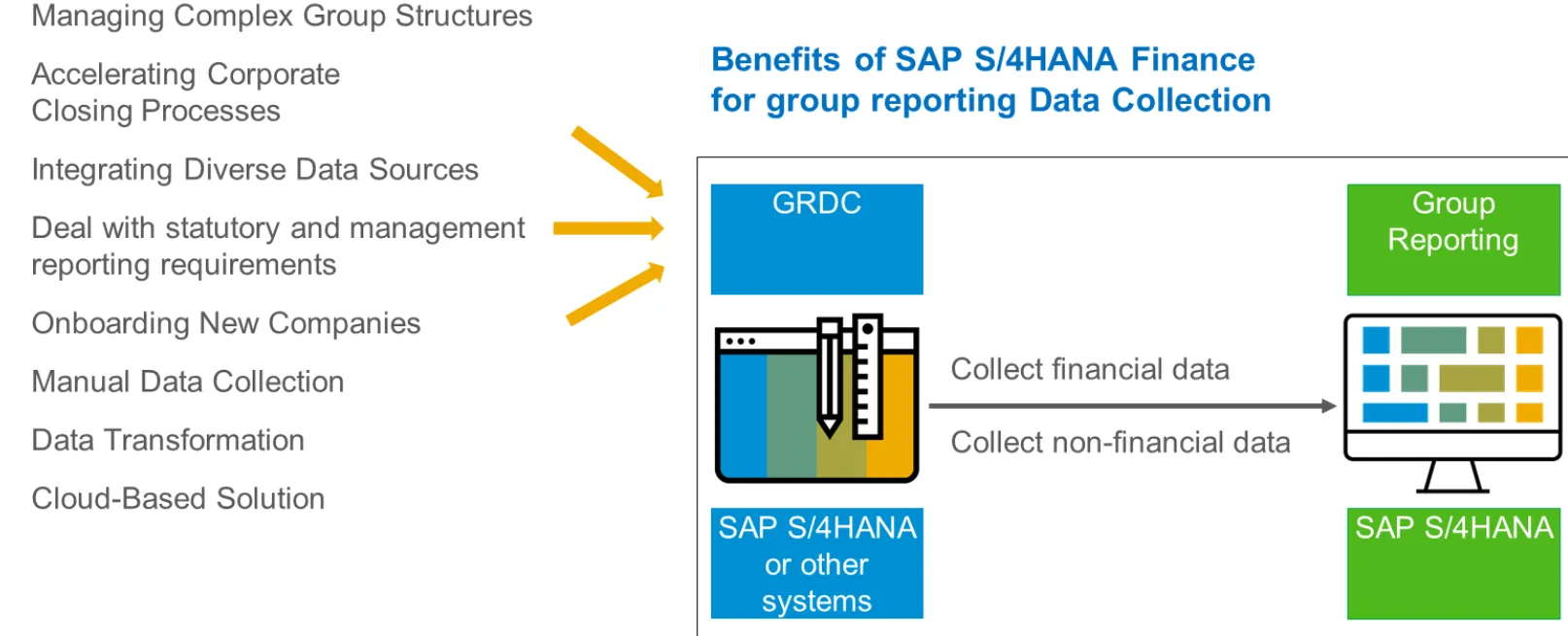
Source: SAP
SAP Group Reporting Data Collection (GRDC) offers a wide range of advantages that make it a powerful solution for organisations managing complex financial consolidation needs.
Some of the key benefits include:
• Handling complex group structures: Large enterprises often operate across multiple countries with numerous subsidiaries running on different ERP systems. GRDC enables seamless collection of financial information from these diverse entities, ensuring accurate consolidation.
• Integration of multiple data sources: Whether it’s financial, managerial, or operational data, GRDC brings everything together into a single, unified source for analysis and reporting.
• Quick onboarding of new entities: When companies acquire new businesses, GRDC accelerates integration by mapping their existing financial data into the SAP S/4HANA structure.
SAP S/4HANA Finance for group reporting Data Collection is developed on the SAP Cloud Platform
SAP S/4HANA Finance for Group Reporting Data Collection (GRDC) is built on the SAP Business Technology Platform (SAP BTP)
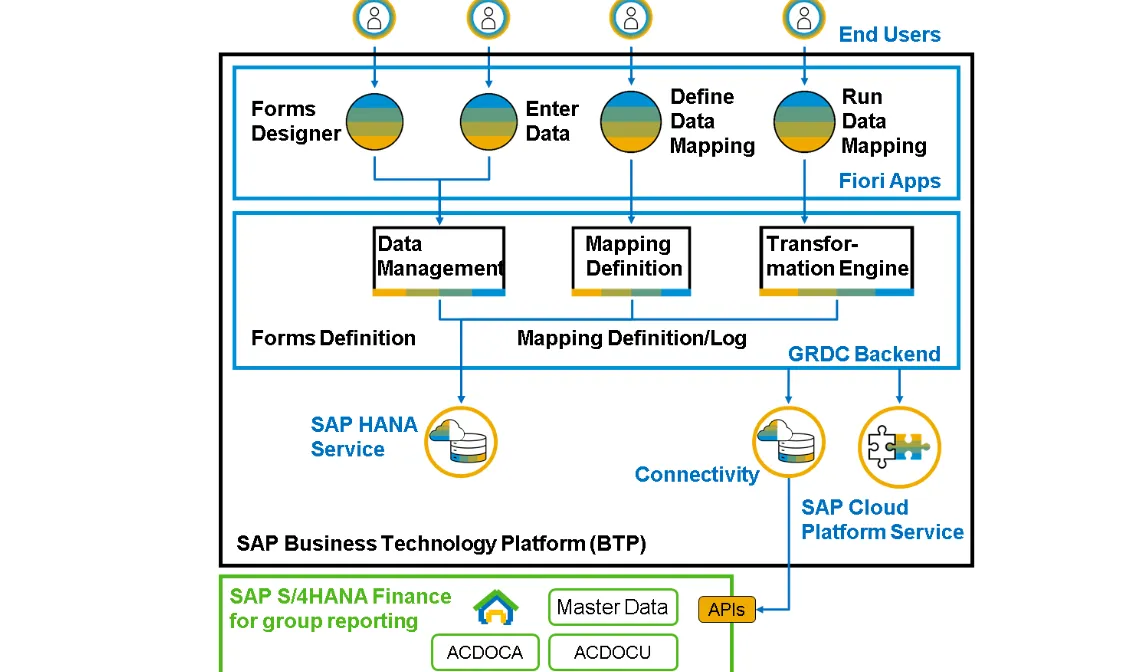
Source: SAP
Technical setup:
• GRDC consists of cloud-native applications that connect to SAP S/4HANA but run independently from the core system.
• GRDC must always be used together with SAP S/4HANA Finance for Group Reporting, since all master data and consolidated financial figures are stored in the ACDOCU table within S/4HANA.
Data and services:
• Configurations and collected items are stored using SAP HANA services available on SAP BTP.
Integration methods:
• GRDC integrates with SAP S/4HANA using Remote Function Calls (RFCs) and public APIs.
Integration with ACDOCU
• GRDC feeds directly into the ACDOCU table, the central repository for consolidated financial data in SAP S/4HANA.
• Ensures consistency between local entries and group-level reporting.
What is the GRDC's release strategy?
GRDC is a cloud-native application and SAP has the goal of releasing updates on a bi-weekly basis. Each release aims to fix bugs, introduce new features, and improve overall system performance.
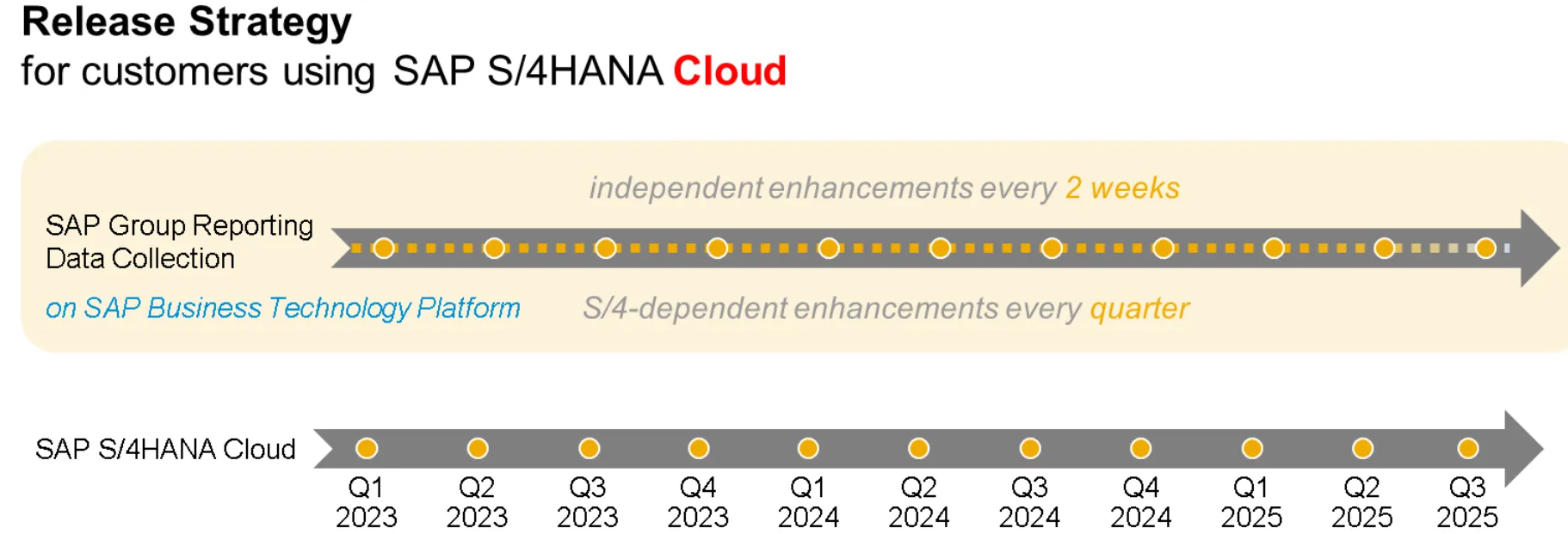
SAP ensures that it releases GRDC updates that align with the updates in SAP S/4HANA Cloud and SAP S/4HANA on-premises. This strategy guarantees seamless integration of the application with the entire SAP S/4HANA suite.
The deployment of regular updates may require configuration changes on the customer's part. It is important to review the release notes provided by SAP with each update.
Prerequisites of Data Mapping
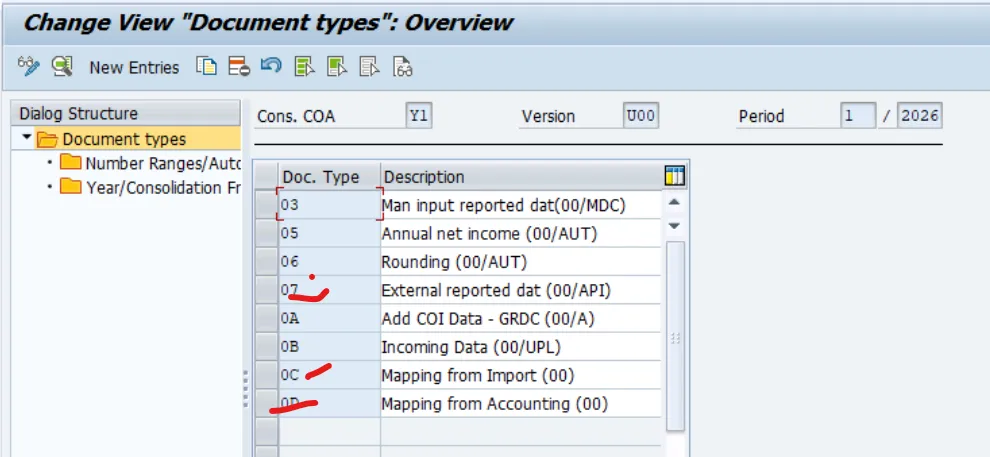
1. Document types (0C, 0D, and 07) used for data mapping in SAP S/4HANA Finance for group reporting Data Collection apps.
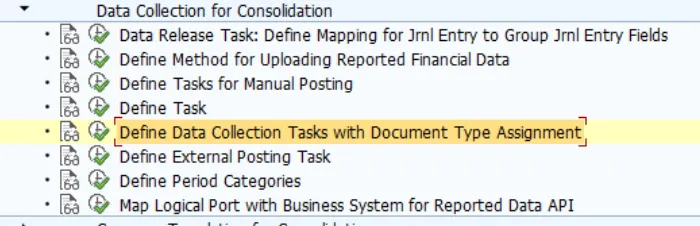
2. Assignment of the document types to the Data Upload task 1020 - Data Collection.
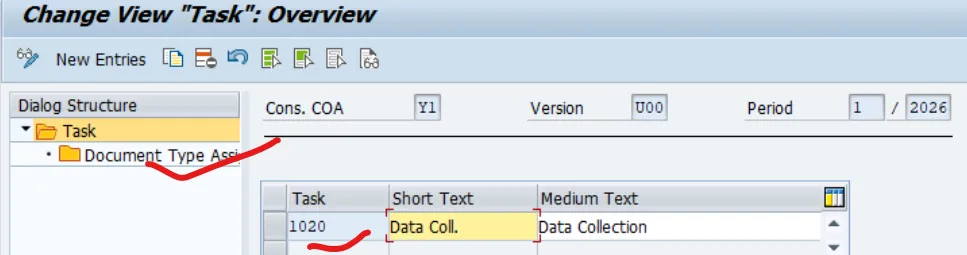
3. Ensure the periods are open before starting the upload with the Run Mapping app.
Document Type 0C = Source/Data mapped from a file.
Document Type 0D = Source/Data mapped from the ACDOCA S/4HANA table
Document Type 07 = Source/Data mapped from an external source (Import API) or retrieved through the Group Journal Entries (ACDOCU).
Data collection Task in Data Monitor:
For all kinds of Data Uploads task 1020 - Data Collection is delivered in the content.
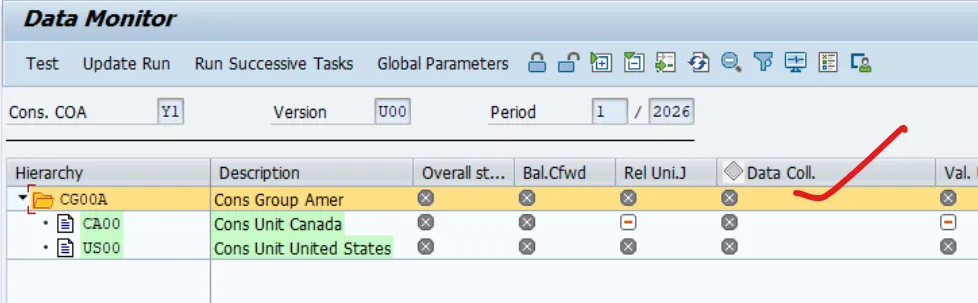
• Document type 00 is the document type used by the system for postings, when you use the upload interface SAP S/4HANA Finance for group reporting itself delivers.
• Document type 0C, 0D, and 07 are used by the system for postings when SAP S/4HANA Finance for group reporting Data Collection or the API solution are used.
In both cases the document type has to be assigned to the task for your consolidation version. This assignment uses the effective fiscal year and effective period.
Pre-setting before Starting with GRDC
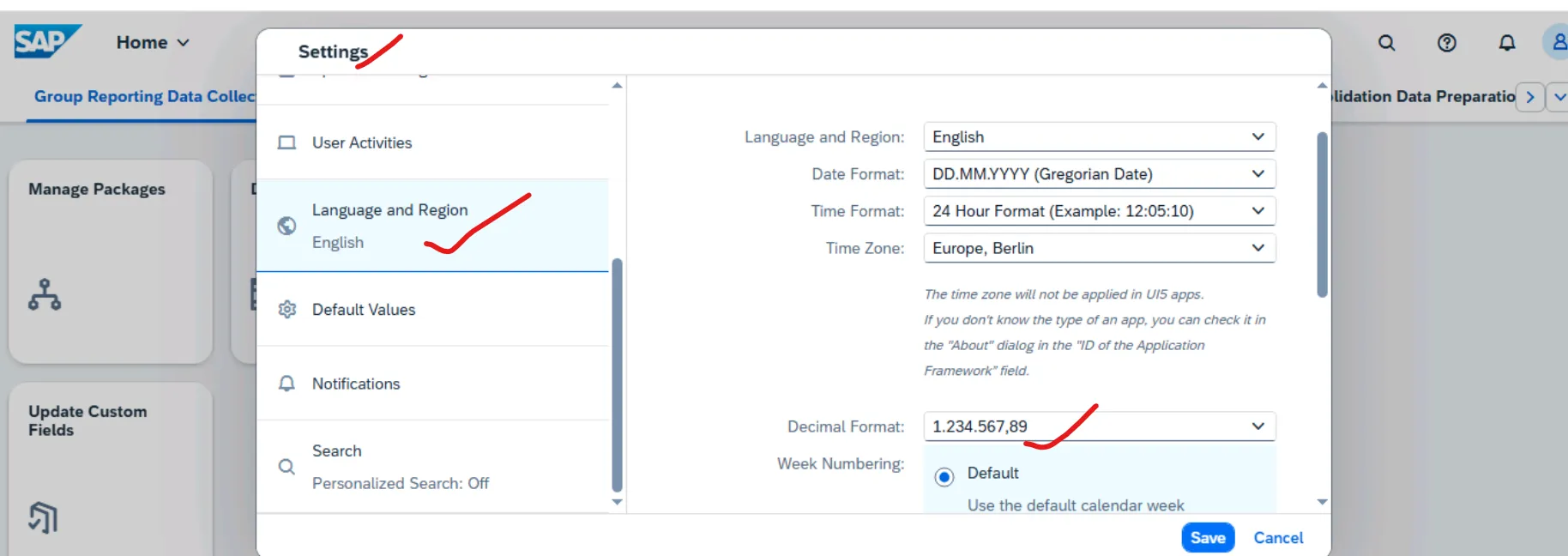
SAP Fiori Pre-setting before Starting with GRDC
• When you set your language and region settings on the SAP Fiori Launchpad, you should not only determine the language of the application but also the thousand and decimal separator used in SAP S/4HANA Finance for group reporting Data Collection
• Since the Run Mapping app for example checks if the Global Parameters are set, you will have to set them before you start working with SAP S/4HANA Finance for group reporting Data Collection.
• The Periods in which you will load your data have to be open before you start the upload with the Run Mapping app.
The Process Steps of Data Mapping - CSV Source File Scenario
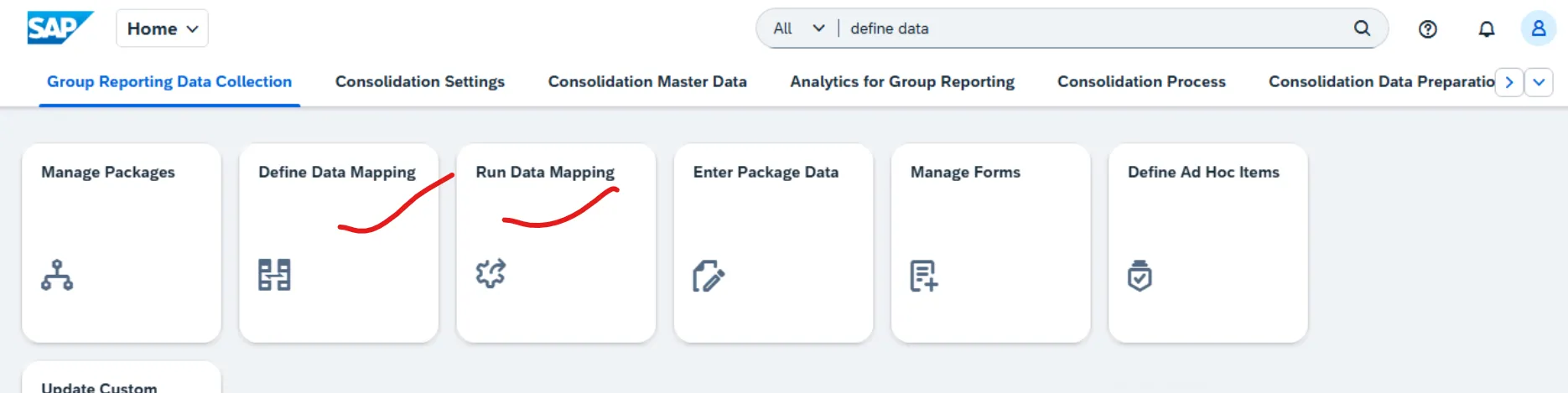
Data Collection in SAP S/4HANA Finance for Group Reporting is a flexible ETL tool that enables defining source-to-target mappings, running or scheduling mapping jobs, and checking results in traceability logs. It supports importing data from CSV files, SAP ECC, remote systems via Import API, ACDOCA data from remote or local systems, and additional ACDOCA data for statistical purposes such as AR/AP aging. Using the Define Data Mapping app, mappings can be created between external source dimensions and target dimensions in SAP S/4HANA, with supported source types including CSV files, ACDOCA, and ACDOCU data. Transformation rules are managed through delivered Excel mapping templates that provide predefined column structures to guide mapping definitions, ensuring data is transformed and loaded into the ACDOCU table, the central target for group reporting. The Run Data Mapping app then executes mapping jobs to import transformed data, with importing CSV files into ACDOCU being the most common use case
Collecting Manual Data in SAP S/4HANA Finance for Group Reporting Data Collection
Below are SAP Delivered Manual Data Collection Applications in GRDC
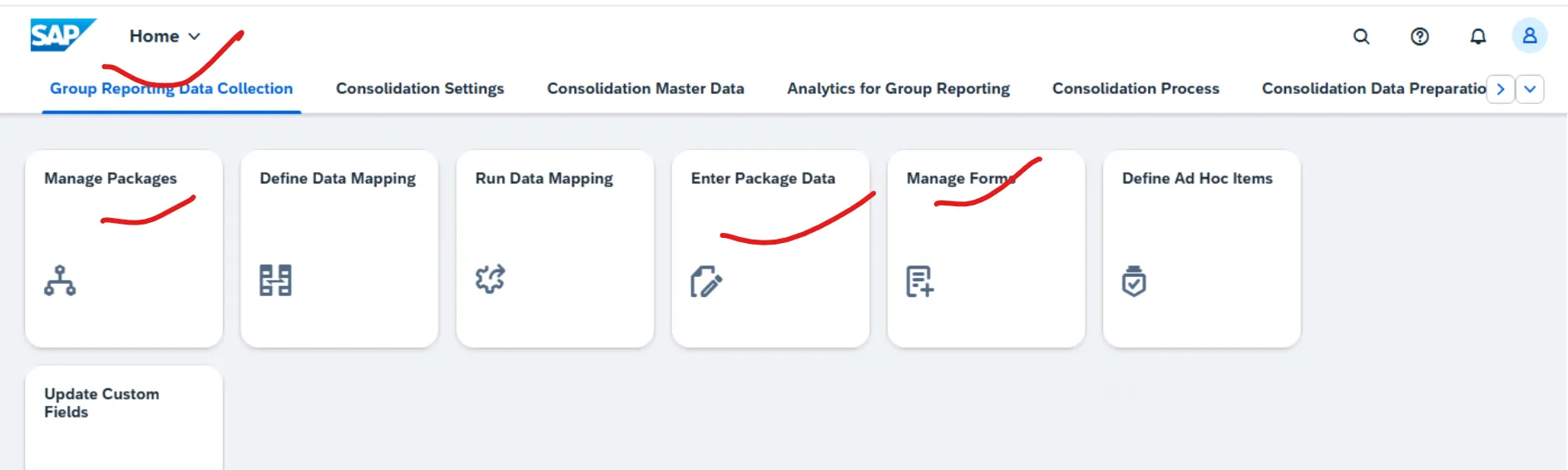
SAP S/4HANA Finance for group reporting data collection forms enables you to manually enter financial and non-financial data in SAP S/4HANA Finance for group reporting (in the ACDOCU table), either by using SAP pre-delivered content or by creating your own forms.
1. Using the Manage Forms app, you can create and edit your own forms. In addition, you can organise forms in folders and associate these folders with packages.
2. Using the Manage Packages app, you can create and edit package definitions. The package definition allows you to define the data entry environment applied to a package.
3. Using the Enter Package Data app, you can consult, correct, and complete group reporting data in forms.
Conclusion
SAP S/4HANA Finance for Group Reporting Data Collection (GRDC) is more than just a data collection tool—it is a strategic enabler for enterprises navigating the complexities of global financial consolidation. By combining automated data mapping with flexible manual input forms, GRDC ensures that organisations can harmonise information from diverse systems, subsidiaries, and geographies into the ACDOCU consolidation table with accuracy and efficiency.
Additional Information:
Here are the official SAP GRDC help links you can use right away:
• User Guide for SAP Group Reporting Data Collection (GRDC) – Comprehensive guide covering manual data collection, data mapping, and ETL features.
• SAP GRDC Help Portal – Full Documentation & What's New – Includes administration guides, connectivity options, and release updates.
https://help.sap.com/crawler/PRODUCTION/SAP_Group_Reporting_Data_Collection/1.0/en-US
• Group Reporting Overview (SAP Help Portal) – Explains how GRDC integrates with SAP S/4HANA Cloud and SAP Analytics Cloud
More Blogs


