
Eursap's SAP Tips: Seven S/4HANA Master Data Tips for Your First SAP S/4HANA Project
Seven S/4HANA Master Data Tips for Your First SAP S/4HANA Project.
SAP S/4HANA changed how master data works, but many users still use ECC habits. The Business Partner is now mandatory, Fiori sits alongside SAP GUI, and HANA has changed what is sensible to run against the database. Some old ECC tricks still work, but some have either gone away or need tweaking.
Here are seven practical tips to use on S/4HANA projects, hopefully particularly important if it’s your first S/4HANA project. Each one saves time, prevents a data quality problem, or answers a question that might otherwise end up as a support ticket. Most of them need no development and no extra licence.
1. Find the Fiori equivalent of any transaction
As an SAP consultant on an S/4HANA project, you need to get used to the question, "What's the Fiori app for MM03?" Here is where you don’t need to guess because the SAP Fiori Apps Reference Library (URL: https://pr.alm.me.sap.com/launchpad#FALApp-display) lets you search by transaction code. It returns the Fiori apps that replace or complement it, filtered by your S/4HANA release. See below screenshot advising that there are five Fiori apps related to MM03:
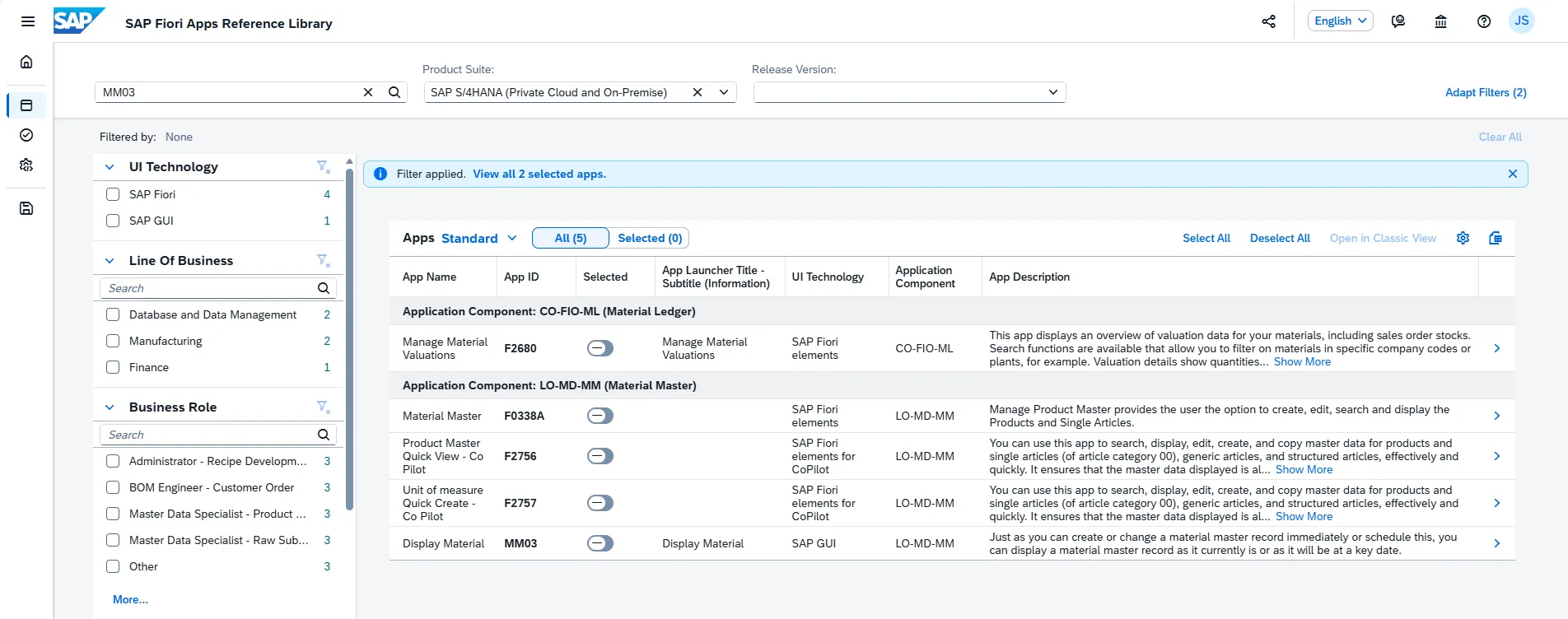
For each app, it shows the technical name, the business catalogue and role needed to see it, and whether it runs on-premises, in the private cloud or in the public cloud. The last point is important, because apps are listed which may not run in your version or release. For example, take the app F0338A “Material Master”, as listed in the above screenshot. This is deprecated now: see the “Deprecated” status in the App Status field. Dropping down the Version button will tell you it is only available in versions 1610 FPS2 and 1709.
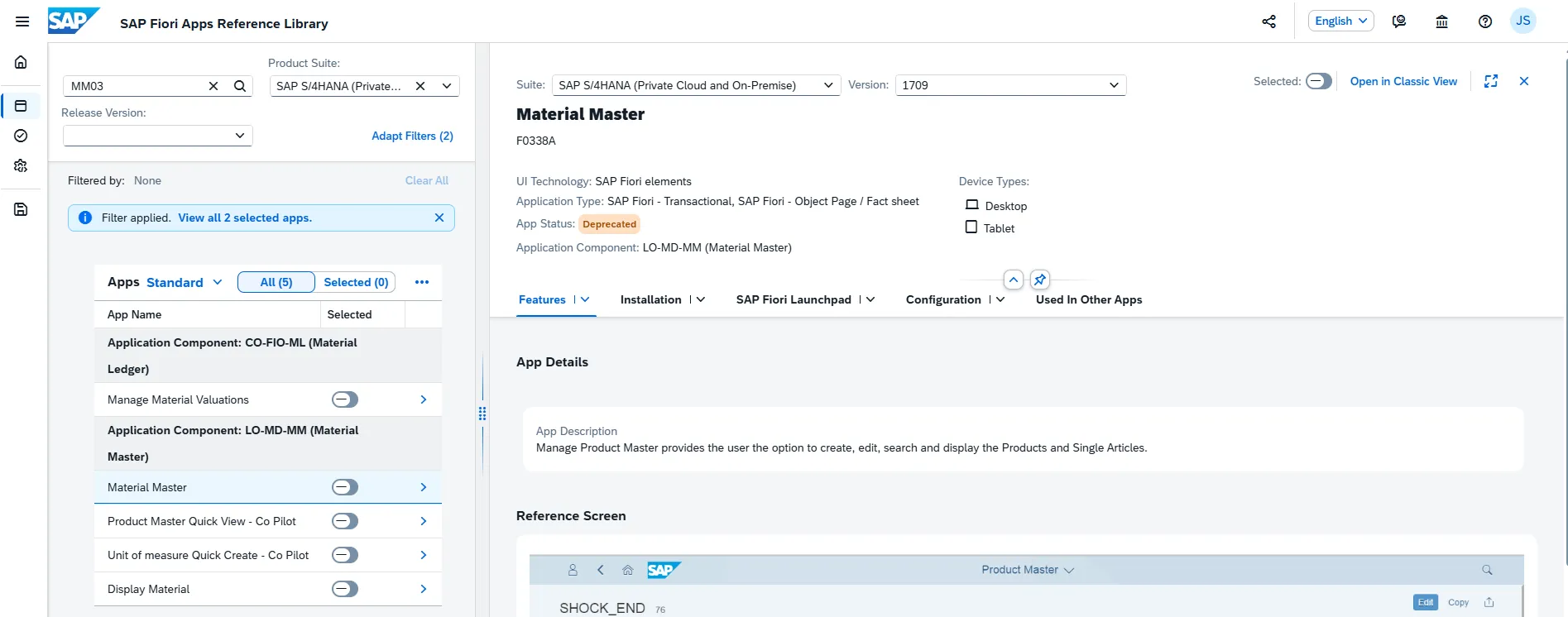
Version availability:

2. Use SE16H, not SE16N
SE16N is still there, but SE16H is the better choice on HANA. It looks familiar, but also adds options most people never notice:
- Group and aggregate on the selection screen, such as counting materials by material type and plant, without exporting to Excel.
- Outer joins to a second table, for example MARA to MARC, to find materials not extended to a plant. This replaces the need for all those pesky SQVI reports.
- Distinct values and totals pushed down to the database, so large tables return quickly.
For master data checks this replaces a lot of one-off ABAP reports and spreadsheet lookups.
It’s probably best when deciding on security for SE16H to consider that SE16H can read any table the user is authorised for. Protect it with the same table authorisation controls (S_TABU_DIS, S_TABU_NAM) as SE16N.
3. Keep one number for BP, customer and supplier
In S/4HANA every customer and supplier is created through the Business Partner, and Customer-Vendor Integration (CVI) creates the linked customer or supplier record. If numbering is set up carelessly, the same company might have, for example, a certain BP number, a different customer number and yet another different supplier number. This would mean that every reconciliation, interface mapping and support call would start with a lookup.
CVI can keep them identical. In Customising under “Cross Application Components > Master Data Synchronisation > Customer/Vendor Integration”, define the number assignment from BP to customer and from BP to supplier, and tick "Same Number" for each BP grouping.
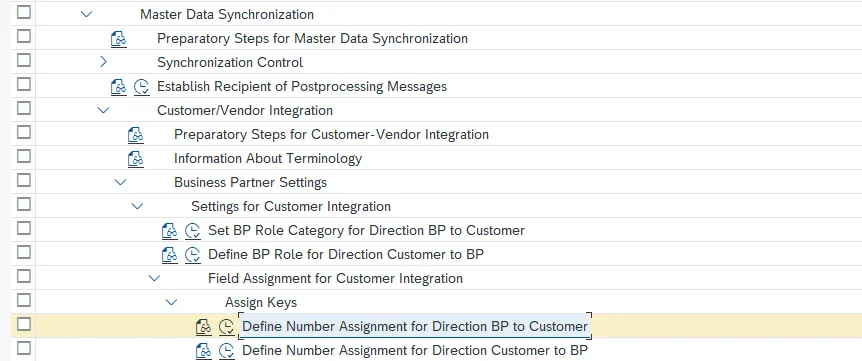
For this to work, the customer or supplier account group needs an external number range that matches the BP grouping's internal range. The BP then assigns the number and CVI reuses it.
It is important to settle this before the first BP is created. Fixing numbering after go-live means changing the keys used by every open item and document, which is not a small job.
4. Check MDS_PPO2 when BP sync fails
When a Business Partner saves but the customer or supplier record doesn't update, the error sometimes shows on screen, but not always. Sometimes it goes to what is called post-processing. The transaction lists these failed synchronisations, with the BP, direction, and error message.
Common causes include a missing mandatory field on the customer account group, a tax number format check, or a bank detail that the supplier side rejects. From MDS_PPO2 you can correct the data and reprocess the entry.
It’s a good habit to get into to make MDS_PPO2 part of your daily master data monitoring, especially after mass loads or interface runs. A BP that looks fine but has no matching customer will block a sales order later, usually at the worst possible time.
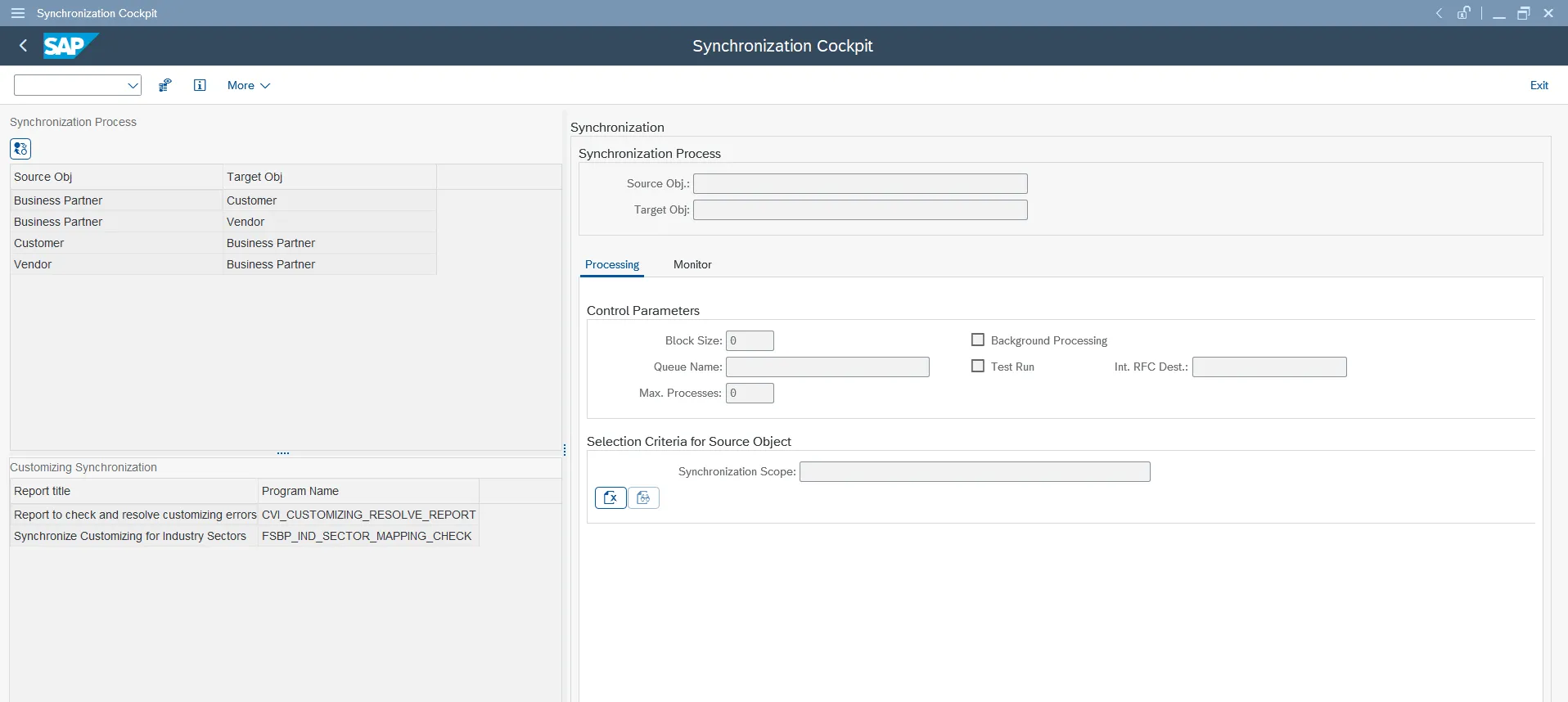
During an ECC conversion, the same logic applies to the initial load. In ECC6, transaction CVI_COCKPIT guides you through the checks (check SAP KBA 3147029 for installation of the cockpit), and in S/4HANA, transaction MDS_LOAD_COCKPIT runs the synchronisation from customer and supplier to BP.
5. Use the Migration Cockpit after go-live
As an SAP consultant on your first S/4HANA project, you have probably been introduced to the Migration Cockpit (transaction LTMC or Fiori app “Migrate Your Data”), to replace LSMW.
Most teams see the Migration Cockpit as a go-live tool and stop using it go-live is complete. However, it is just as useful for planned mass loads after go-live, such as a new plant, an acquired company's suppliers, or a batch of new products.
The staging tables approach is the one to learn. Data is loaded into database tables first, so it can be filled from a file, from another system, or by a script. The cockpit then validates it against S/4HANA's own checks, maps values such as old plant codes to new ones, and posts it through standard APIs.
That gives you something LSMW never did: a full simulation run that reports every error before anything is posted.
6. Add fields with the Custom Fields app, not ABAP appends
When the business wants a new field on the product or Business Partner, that used to mean that, in the ECC days, you had to assign a developer to create an append structure and a screen exit. All this amounted to a few weeks of additional work.
In S/4HANA, key user extensibility makes this a configuration task. The Fiori app “Custom Fields” (earlier called Custom Fields and Logic) lets an authorised key user:
- Create the field with its type, length and value help.
- Choose the business context, such as Business Partner or Product, and enable it for the UIs, reports, APIs and forms you need.
- Publish it and the field appears in Fiori apps, CDS views and OData services with no extra build.
Because the field is available in standard APIs, interfaces and migration objects can use it straight away. Changes move through the system landscape using the key user transport process.
Bear in mind here that not all requests for new fields require SAP additions. If you are using a master data governance system like SimpleMDG, a custom field may be able to be kept away from SAP entirely and just exposed in the MDG solution, thus supporting your clean core approach.
7. Hide what users don't need with Adapt UI
Standard Fiori master data apps show many fields that most businesses never use. Every unused field is a chance for someone to fill in the wrong thing, and a reason for new starters to feel lost.
With the right authorisation, Adapt UI in the Fiori launchpad user menu lets a key user change an app's layout for everyone:
- Hide fields and whole sections that aren't relevant.
- Move fields so the important ones come first.
- Rename labels to match the business's own terms.
These changes are adaptations, not modifications, so they survive upgrades. Users can still personalise their own view on top.
Bear in mind that hiding a field is not the same as preventing input. If a field must never be filled, control it with field status, validation or authorisation, not just the UI.
Again, these kinds of things are a piece of cake with the right MDG solution.
More Blogs


